iOS 27 Brings Create a Pass Feature: Turn Physical Cards Into Digital Ones in Apple Wallet
Baca dalam 60 detik
- Apple memperkenalkan fitur Create a Pass di iOS 27 yang memungkinkan pengguna mengonversi kartu anggota, kartu loyalitas, tiket acara, kupon, dan kartu referensi fisik menjadi pass digital di Apple Wallet tanpa perlu dukungan resmi dari penerbit.
- Fitur ini menawarkan dua jalur pembuatan: otomatis dengan Apple Intelligence dan Visual Intelligence, atau manual dengan mengisi template yang disediakan; namun pass buatan pengguna tidak terautentikasi oleh organisasi terkait sehingga penerimaan di lapangan bergantung pada kebijakan masing-masing.
- Meskipun demikian, fitur ini berpotensi mengurangi kekacauan kartu fisik, terutama untuk kartu dengan barcode statis, dan dapat diuji secara gratis setelah memperbarui ke iOS 27 pada perangkat yang kompatibel.
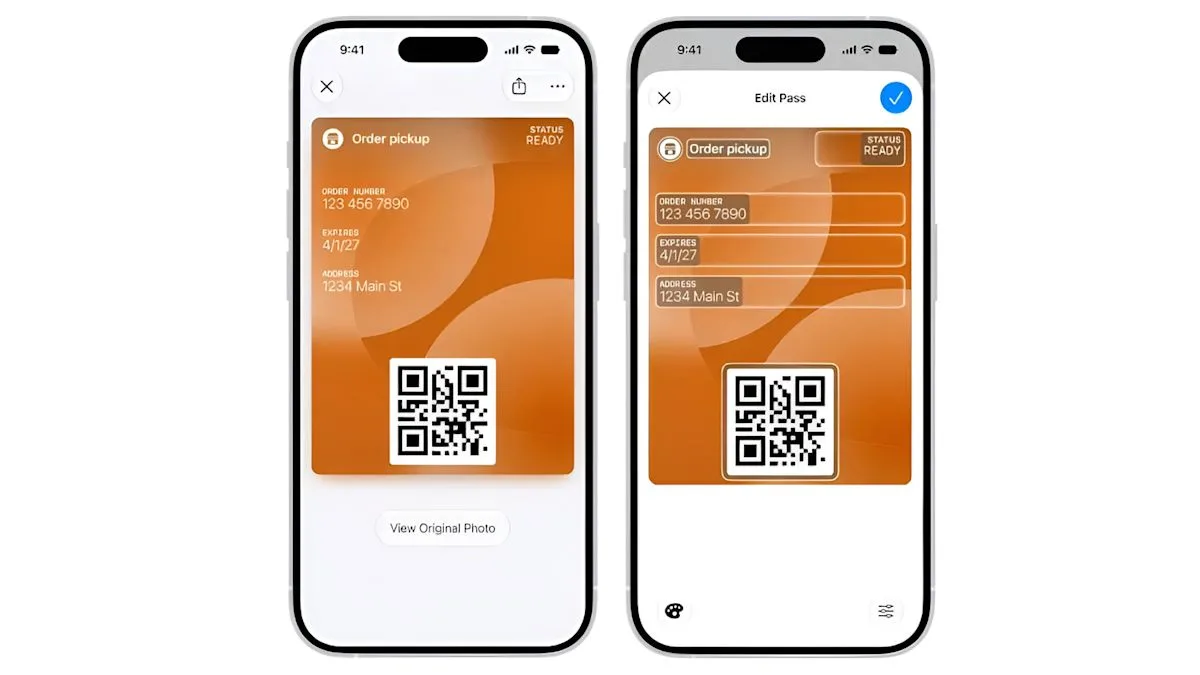
Apple officially announced a new feature called Create a Pass built into iOS 27, allowing users to turn various physical cards such as membership cards, loyalty cards, event tickets, coupons, and reference cards into digital passes in the Apple Wallet app. The feature arrives without having to wait for the original issuer to develop official support, as confirmed in Apple support documentation released in September 2026.
This step marks a significant shift in the Wallet ecosystem, which previously only accepted passes from official issuers. With Create a Pass, users now have greater control over the cards they own, especially those that have rarely been used or do not have a digital version. Apple provides two creation paths: one relies on Apple Intelligence and Visual Intelligence artificial intelligence to scan a physical card or screenshot, and another is entirely manual.
The automatic path begins by opening Wallet, tapping Add Card, selecting Create a Pass, then photographing the card. The system will extract the information and users can review it before saving. Meanwhile, the manual path is intended for cards without scannable codes or devices that do not support Apple Intelligence. Users can choose a standard, membership, or event template, fill in the relevant fields, attach a barcode or QR code if available, and save it.
According to a MacRumors report, the available fields include label, date, membership details, contact information, coupon code, insurance details, and vehicle identification number. Apple also notes that usage restrictions may apply to the Apple Intelligence-based scanning flow. In addition, iOS 27 expands the barcode formats supported by Wallet, now including EAN-13, Code 39, Codabar, and ITF, joining existing formats such as QR, PDF417, Aztec, and Code 128, as revealed in the WWDC 2026 session.
Although it sounds promising, there is an important note: user-created passes are not official passes issued or authenticated by the organization whose name appears on them. Staff at a gym, venue, or pharmacy may still ask for a physical card or a pass from the organization's official app. Acceptance of self-made passes depends entirely on each party's policy.
"A user-created pass is your creation, not the issuer's, and that difference matters at the door," warns the Apple documentation.
A more complicated challenge arises with rotating or time-dependent QR codes. A static copy of a dynamic QR code can become invalid immediately once the original app refreshes it. This is a fundamental limitation of the system, not a flaw in the feature. In addition, account balances, reward points, and access permissions are not automatically synchronized for user-created passes; what is stored is only a static snapshot at the time of creation.
Nevertheless, for cards with static barcodes, this feature is very helpful. A gym membership card with a static barcode, a rarely used store loyalty card, or an insurance card that only needs a quick glance from staff can all be handled well by Create a Pass. The feature is free and integrated into Wallet, so it is worth trying before deciding to keep carrying the plastic card.
For users in Indonesia, the presence of Create a Pass can be a practical solution to reduce the pile of physical cards often carried daily. However, adoption in the country will depend heavily on the willingness of local merchants, such as fitness centers, retailers, or event organizers, to accept user-created digital passes. Data protection regulations and digital verification standards in Indonesia may also affect the extent to which this feature can be widely accepted.
Going forward, this feature opens opportunities for Apple to expand its Wallet ecosystem, but also raises questions about the boundary between convenience and security. Will organizations in Indonesia start adopting user-created digital passes, or stick with conventional verification systems? Time will tell, but Apple's move clearly pushes us closer to a fully paperless digital wallet era.